

Introduction
At Numberfied, our Xero bookkeeping services combine friendly expertise with efficient processes to help small businesses gain clarity and control over their finances. Whether you are switching systems, cleaning up messy books, or outsourcing ongoing bookkeeping, our team guides you through every step with practical advice and action-oriented support. Read on to learn how Xero bookkeeping services can transform your accounting and how to get started with Numberfied.
Key Takeaways
- Xero bookkeeping services provide automated bank feeds, clean reconciliations, and accurate financial reports.
- Numberfied offers setup, migration, training, and ongoing bookkeeping tailored to your business.
- Actionable steps include organizing accounts, setting up rules, and scheduling regular review meetings.
Why Choose Xero Bookkeeping Services
Modern cloud accounting
Xero bookkeeping services leverage cloud-based accounting for secure, real-time access to financial data. You and your advisors can view the same books from anywhere, reducing delays and improving collaboration.
Automation and accuracy
Automation in Xero reduces manual entry and errors. Bank feeds, transaction rules, and smart reconciling tools streamline bookkeeping workflows and free time for strategic work.
Scalability for growth
Xero bookkeeping services scale with your business. From basic bookkeeping to advanced reporting and multi-currency handling, Xero adapts as your needs evolve.
How Numberfied Delivers Xero Bookkeeping Services
Tailored onboarding
We start with a structured onboarding process to understand your business, map accounts, and set priorities. Our Xero bookkeeping services include a tailored chart of accounts and workflow setup to match your unique operations.
Cleanup and migration
If you are moving from legacy systems or spreadsheets, our specialists perform a thorough cleanup and migration. We ensure opening balances, tax settings, and historical data are accurate and accessible.
Ongoing bookkeeping and reconciliations
Our routine bookkeeping tasks include bank reconciliations, supplier and customer ledger management, payroll coordination, and month-end close procedures. Xero bookkeeping services keep your records reliable and reports ready.
Setting Up Xero for Your Business
Plan the chart of accounts
A well-designed chart of accounts is the foundation. Our Xero bookkeeping services review your income streams, expense categories, and balance sheet items to create a logical structure that simplifies reporting.
Bank feeds and integrations
We connect bank feeds and recommend practical integrations for invoicing, payroll, payments, and inventory. Automating data flow reduces duplication and improves timeliness.
Implement controls and permissions
Security and role-based access protect your financial data. As part of Xero bookkeeping services, we configure user permissions and internal controls to maintain integrity and confidentiality.
Practical Bookkeeping Workflows with Xero
Daily and weekly routines
Effective Xero bookkeeping services follow repeatable routines: reconcile bank transactions, review unapproved bills and invoices, and apply transaction rules. These habits prevent backlog and preserve accuracy.
Monthly close checklist
Our monthly checklist includes reconciling bank and credit card accounts, reviewing aged receivables and payables, posting accruals, and preparing management reports. This ensures clean month-end statements.
Quarterly and annual tasks
Quarterly, we review budget variances, prepare tax-ready reports, and advise on cash flow planning. Annual tasks include support for audits and year-end adjustments, which are typical deliverables of our Xero bookkeeping services.
Actionable Tips to Maximize Xero Bookkeeping Services
Use bank rules effectively
Create bank rules to auto-categorize recurring transactions. This reduces manual work and increases consistency across your accounts.
Automate invoice reminders
Enable automatic invoice reminders to speed collections. Xero’s settings can be customized to match your client relationships and cash flow needs.
Schedule regular reviews with your bookkeeper
Set up recurring review meetings with Numberfied to discuss trends, identify issues, and align bookkeeping with your financial goals.
Reporting and Analysis with Xero Bookkeeping Services
Management-friendly reports
Xero provides profit and loss, balance sheet, and cash flow statements. Our Xero bookkeeping services package these reports with narrative insights to support decision-making.
Custom reports and tracking codes
We configure tracking categories and custom reports so you can analyze performance by department, location, or product line.
Forecasting and budgeting
With clean books, we build forecasts and budgets that reflect realistic cash flow and growth projections. These tools help you plan investments and manage seasonality.
Compliance and Tax Preparation
Accurate record keeping
Reliable records are essential for tax compliance. Our Xero bookkeeping services ensure transactions are coded correctly and supporting documents are attached for audit readiness.
Sales tax and VAT handling
We set up tax rates, manage reporting periods, and prepare detailed tax reports. Xero’s tax features, combined with our processes,s reduce risks and simplify filings.
Coordination with tax advisors
We collaborate with your tax professionals to deliver clean trial balances and year-end schedules, minimizing surprises and ensuring compliance.
Industry-Specific Xero Bookkeeping Services
Service-based businesses
For consultants, agencies, and professional services, we manage time-based billing, retainers, and project profitability tracking through Xero’s invoicing and tracking tools.
Retail and ecommerce
Retail businesses benefit from integrations with point-of-sale and inventory apps. Our Xero bookkeeping services connect sales channels, reconcile inventory, and maintain accurate cost of goods sold.
Construction and trades
Project tracking, progress invoicing, and retention management are common needs. We configure Xero to capture job costs and produce actionable project reports.
Pricing Models and Engagement Options
Flexible monthly packages
Numberfied offers flexible engagement options to match business volume and complexity. Packages typically include a set of core bookkeeping services, along with optional add-ons.
Project-based migrations
For one-time projects, we provide migration and cleanup services with a clear scope of work and a delivery timeline.
Ongoing advisory and fractional CFO support
Beyond bookkeeping, our team provides advisory services, including budgeting, cash flow management, and periodic financial strategy sessions.
Common Implementation Challenges and Solutions
Inconsistent data entry
Challenge: Inconsistent transaction descriptions and coding. Solution: We standardize processes, enforce rules, and train your team to maintain consistent entries as part of our Xero bookkeeping services.
Discrepancies in opening balances
Challenge: Mismatched opening balances during migration. Solution: Our reconciliation process isolates differences, and we provide adjustments with clear documentation.
Integration complexity
Challenge: Multiple systems with overlapping data. Solution: We recommend and implement vetted integrations, map data flows, and regularly reconcile synced transactions.
How to Get Started with Numberfied Xero Bookkeeping Services
Initial consultation
Schedule an introductory call to discuss goals, pain points, and current systems. This helps us propose the right Xero bookkeeping services package for your needs.
Onboarding timeline
We provide a clear timeline for setup, migration, and handoff. Expect milestones for data import, reconciliations, and training sessions.
Training and handover
We deliver practical training for your staff and document workflows, ensuring a smooth transition to ongoing operations supported by our Xero bookkeeping services.
Measuring Success with Xero Bookkeeping Services
Key performance indicators
Track KPIs such as days sales outstanding, cash runway, and timely bank reconciliations. These metrics show the impact of professional Xero bookkeeping services on financial health.
Regular reporting cadence
Establish a reporting schedule for weekly cash updates, monthly management reports, and quarterly strategy reviews to maintain momentum and accountability.
Continuous improvement
We use feedback loops to refine workflows and adopt new Xero features that enhance efficiency and insight.
Security and Data Privacy
Cloud security best practices
Xero bookkeeping services adhere to secure practices including two-factor authentication, role-based access, and encrypted data storage.
Document retention policies
We implement organized document storage and retention schedules so critical records are preserved and easy to retrieve when needed.
Access control and audit trails
Xero maintains audit trails and user logs. Our processes include periodic access reviews to ensure only authorized individuals can view or change financial data.
Case Studies: Real Results
Small retailer turnaround
After migrating to Xero and engaging our Xero bookkeeping services, a retailer reduced reconciliation time by half and improved cash forecasting accuracy.
Professional services scaling
A consulting firm standardized billing and collections through Xero rules and reminders, shortening payment cycles and freeing time for growth initiatives.
Construction project clarity
By tracking jobs and costs in Xero, a contractor gained visibility into project profitability and avoided costly overruns.
Choosing the Right Xero Bookkeeping Services Provider
Expertise and certifications
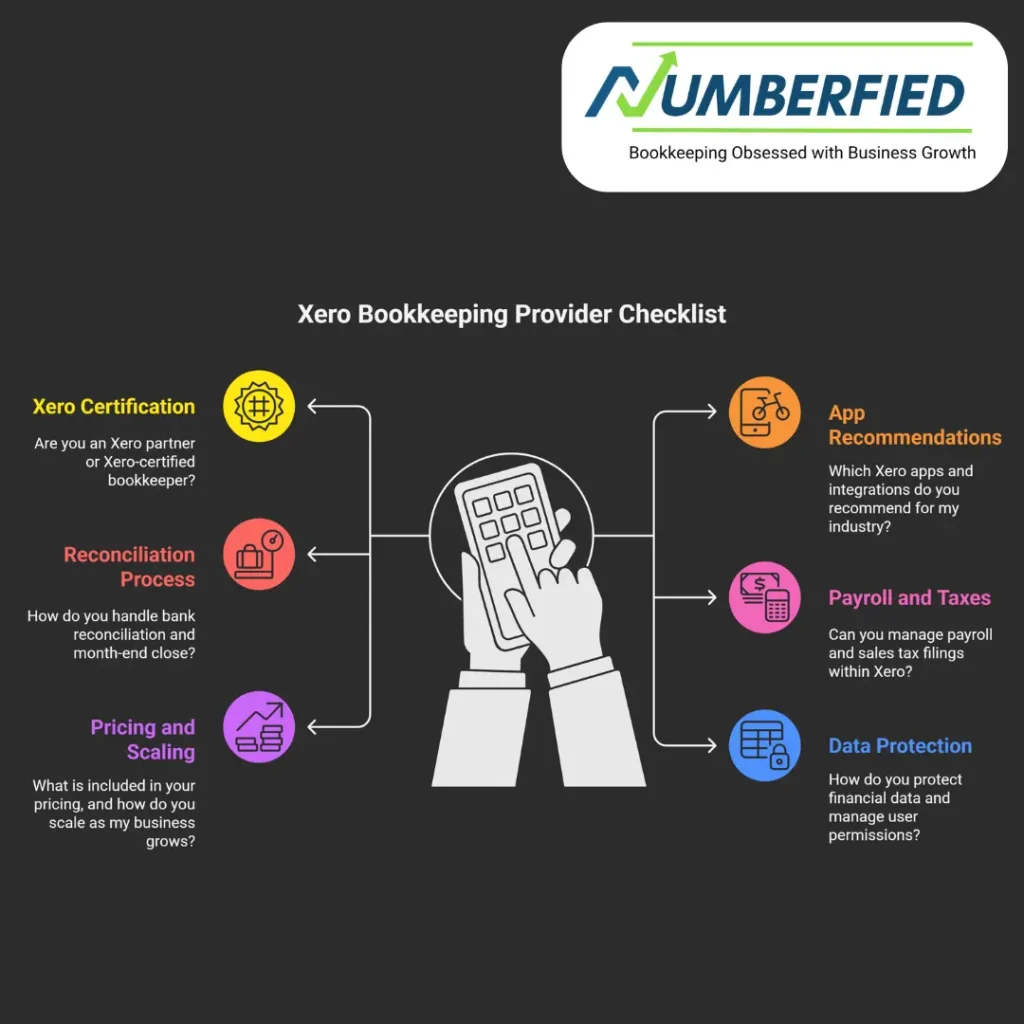
Look for providers with Xero certification, bookkeeping credentials, and relevant industry experience. Numberfied brings verified expertise and a client-centered approach.
Clear communication and transparency
Choose a partner who explains processes, delivers clear results, and provides regular updates. Our communication style is proactive and solutions-focused.
Scalable support
Ensure the provider can scale services as your business grows and can offer advisory support beyond routine bookkeeping.
Conclusion
Xero bookkeeping services offer modern, scalable, and secure tools to keep your finances organized and actionable. Numberfied makes implementation simple with tailored onboarding, reliable ongoing bookkeeping, and practical business advice. Ready to streamline your accounting and focus on growth? Contact Numberfied to discuss how our Xero bookkeeping services can help your business achieve clarity, compliance, and confidence.
Reach out to Numberfied today to book a consultation and start your Xero bookkeeping services journey.
Read Also: The Amazing Way Bookkeeping and Accounting Services in the USA Can Skyrocket Your Success!
Frequently Asked Questions
What are Xero bookkeeping services?
Xero bookkeeping services are professional bookkeeping offerings that use the Xero platform to manage accounts, reconcile transactions, and prepare financial reports for businesses.
How do I migrate to Xero with minimal disruption?
Plan a phased migration, export historical data, reconcile opening balances, and run parallel reports during transition. Numberfied handles the process to minimize downtime.
Can Xero handle multi-currency transactions?
Yes, Xero supports multi-currency accounting. Our Xero bookkeeping services include configuration and monitoring of exchange gains and losses.
How often should my books be reconciled?
Reconciliation frequency depends on transaction volume. Many clients benefit from weekly reconciliations and monthly closes for the reporting services we provide as part of our Xero bookkeeping services.
What integrations work well with Xero?
Popular integrations include payment processors, payroll providers, point-of-sale systems, and ecommerce platforms. We advise on the best integrations for your operations.
How does Xero improve cash flow management?
Xero automates invoicing, tracks receivables, and supports forecast modeling. Combined with our guidance, Xero bookkeeping services help you accelerate collections and plan cash needs.
Is my financial data secure in Xero?
Xero employs robust security measures. Our Xero bookkeeping services add further protection through access controls, two-factor authentication, and best-practice policies.
How do bookkeeping and advisory services differ?
Bookkeeping focuses on accurate records and compliance. Advisory services use those records to guide strategy, budgeting, and financial decisions. Numberfied offers both.
What documents should I keep for bookkeeping?
Keep invoices, receipts, bank statements, payroll records, and tax filings. Attach digital copies to transactions in Xero to streamline record-keeping.
How do I get started with Numberfied for Xero bookkeeping services?
Contact Numberfied for an initial consultation. We’ll assess your needs, propose a plan, and outline onboarding steps to implement Xero bookkeeping services efficiently.
Read Also: Why Everyone’s Switching to Xero Bookkeeping Services And You Should Too!