

Introduction
Using Xero Small Business Insights can significantly improve how small businesses manage finances, monitor performance, and plan for future growth. Many business owners face challenges with tracking cash flow, organizing financial records, managing invoices, and making confident decisions based on accurate data. Xero Business Insights helps solve these issues by providing real-time financial visibility, automated reporting, and clear operational data that support smarter business management. Instead of relying on outdated methods or incomplete financial information, businesses can use these insights to understand spending patterns, monitor income, improve budgeting, and identify growth opportunities with greater accuracy.
Xero Business Insights also helps streamline daily operations by simplifying bookkeeping, improving collaboration, and enabling business owners to access financial information from anywhere. This level of financial clarity is essential for businesses that want to remain competitive, improve efficiency, and maintain stronger control over their operations. At Numberfied, businesses receive professional support in implementing and maximizing Xero Business Insights to improve financial organization, reporting accuracy, and long-term planning. This article explains practical strategies, real-world applications, and actionable guidance that can help businesses use Xero Business Insights to strengthen financial control, improve decision-making, and support sustainable business success.
Key Takeaways
- Xero Small Business Insights help you track performance, predict cash flow, and identify growth opportunities.
- Integrating Xero Business Insights with your workflows reduces administrative time and improves decision-making.
- Numberfied offers support and services to implement Xero Business Insights for faster results.
Understanding Xero Small Business Insights
What are Xero Small Business Insights?
Xero Small Business Insights are concise, data-driven summaries and dashboards that draw from your bookkeeping and connected apps to highlight financial trends, cash flow forecasts, and performance metrics. They are designed to be easy to interpret and actionable for owners and managers.
Why insights matter for small businesses
Small businesses benefit from clarity. Xero Business Insights provides a timely view of receivables, payables, and profitability so you can make proactive choices about hiring, inventory, and investments. Insights reduce guesswork and make planning more reliable.
How Xero integrates with other systems
Xero works with payroll, CRM, inventory, and payment platforms. When you consolidate data, Xero Business Insights becomes richer, enabling better forecasting and scenario analysis. Integrations also reduce duplicate data entry, saving time and minimizing errors.
Setting Up Xero Small Business Insights
Preparing your chart of accounts
Start by organizing your chart of accounts clearly. Consistent account names and classifications improve the accuracy of Xero Small Business Insights and simplify reporting. Avoid overly granular accounts that obscure the bigger picture.
Connecting bank feeds and apps
Enable automatic bank feeds and link payments and billing apps. Frequent data updates ensure Xero Business Insights reflect current activity, so you can act on real-time trends rather than outdated reports.
Customizing dashboards for relevance
Create dashboards that match your business priorities, such as cash flow, gross margin, or job profitability. Custom views make Xero Business Insights easy to use at a glance and help your team focus on the right metrics every day.
Analyzing Cash Flow with Xero Small Business Insights
Reading cash flow forecasts
Cash flow forecasts in Xero show expected inflows and outflows based on invoices, bills, and bank transactions. Use these forecasts to identify potential shortfalls and plan financing or adjustments before they affect operations.
Managing receivables and payables
Apply aging reports and collections dashboards to prioritize overdue invoices and negotiate payment terms with suppliers. Xero Business Insights reveal which customers or vendors affect cash most, enabling targeted actions.
Running what-if scenarios
Model different scenarios, such as slower sales, delayed payments, or increased expenses, to see how cash flow responds. Xero Business Insights, combined with scenario planning, supports smarter decisions about hiring, inventory, and capital expenditures.
Improving Profitability Using Xero Small Business Insights
Tracking gross margin by product or service
Use item tracking and cost categories to see which offerings are most profitable. Xero Small Business Insights helps you identify low-margin items and refocus efforts on higher-value lines.
Monitoring labor and overhead
Allocate payroll and overhead accurately to jobs or departments. When overhead is visible through Xero Business Insights, you can target efficiency improvements and improve pricing strategies.
Using project and job costing
Implement project tracking to capture time and expenses at the job level. Xero Business Insights will show profitability per project, making it easier to bid competitively and avoid undercharging.
Operations and Efficiency with Xero Small Business Insights
Automating routine bookkeeping
Automate bank reconciliation, recurring invoices, and supplier bills to reduce manual work. Automation increases the frequency and reliability of Xero Small Business Insights and frees teams for value-added activities.
Standardizing processes
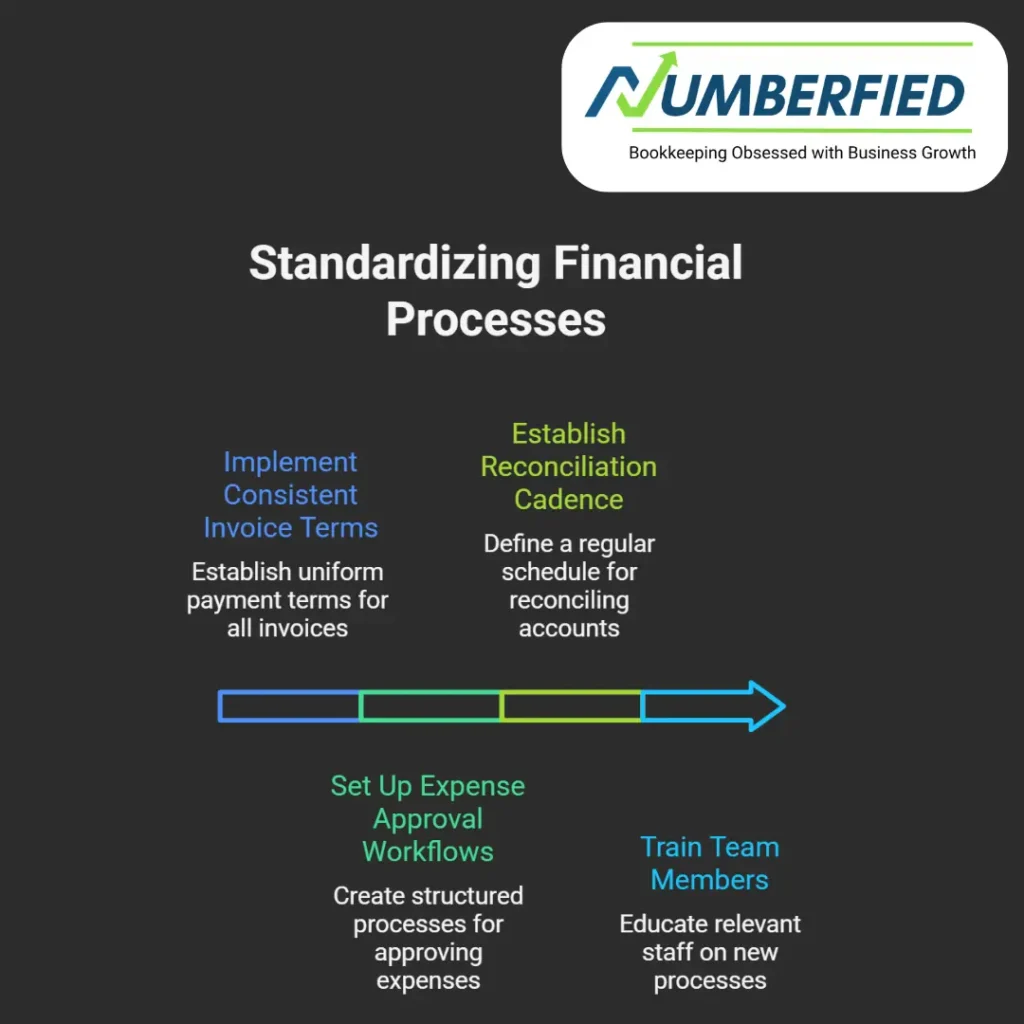
Create standard operating procedures for invoicing, expense approvals, and reconciliation. Consistent data entry supports cleaner Xero Business Insights and better cross-team collaboration.
Training staff on financial literacy
Invest in basic financial training so your team understands key metrics. When staff can read Xero Business Insights, they make decisions that align with business objectives and improve operational outcomes.
Using Xero Small Business Insights for Strategic Planning
Setting measurable goals
Translate high-level objectives into measurable KPIs tracked in Xero. Use Xero Small Business Insights to monitor progress against sales targets, margin goals, and cash reserves.
Quarterly and annual planning
Leverage historical data and forecasts from Xero to create realistic budgets and rolling forecasts. Xero Business Insights makes it easier to update plans as conditions change.
Evaluating investment opportunities
Assess returns on marketing, equipment, or new hires by modeling their impact on cash flow and profit. Xero Small Business Insights provides the baseline data needed to objectively compare alternatives.
Data Security and Compliance with Xero Small Business Insights
Maintaining secure access
Control user permissions and use two-factor authentication to protect financial data. Restricting access ensures Xero Small Business Insights remain accurate and confidential.
Staying compliant with reporting
Set up automated reporting schedules to meet tax and regulatory deadlines. Xero Small Business Insights help ensure you have the documentation and numbers you need when you need them.
Backing up and auditing
Use audit logs and regular reviews to validate entries and detect anomalies. Reliable records improve the trustworthiness of Xero Business Insights for decision-making and external reporting.
Actionable Steps to Implement Xero Small Business Insights Today
Step 1: Complete a data health check
Review your chart of accounts, reconcile bank statements, and close outstanding reconciliations. A data health check improves the reliability of Xero Business Insights and reduces surprises.
Step 2: Prioritize key metrics
Decide on the three to five KPIs that matter most: cash runway, gross margin, recurring revenue, customer acquisition cost, or days sales outstanding. Configure dashboards to surface those Xero Business Insights daily.
Step 3: Schedule regular review meetings
Hold weekly or monthly check-ins to review dashboards and agree on actions. Use Xero Business Insights to drive accountability and track the impact of changes over time.
How Numberfied Enhances Xero Small Business Insights
Implementation and setup support
Numberfied helps set up accounts, integrate apps, and configure dashboards so you get meaningful Xero Business Insights from day one. Our team tailors settings to your industry and goals.
Ongoing advisory and interpretation
Data is more useful with context. Numberfied provides interpretation, identifies trends, and recommends actions based on Xero Business Insights to help you move from data to results.
Training and change management
We train teams to use Xero effectively and embed new processes. With Numberfied, Xero Business Insights become part of your operational rhythm rather than an occasional report.
Measuring Success with Xero Small Business Insights
Establish success criteria
Define what success looks like: shorter invoicing cycles, improved margins, or higher cash reserves. Use Xero Business Insights to monitor progress against these criteria.
Track improvements over time
Compare monthly and quarterly reports to see trends. When you measure consistently, Xero Small Business Insights demonstrates the impact of process changes and strategic investments.
Refine based on results
Use outcomes to iterate. If a change doesn’t move the needle, adjust your approach. Xero Business Insights offers the evidence base for continuous improvement.
Common Challenges and How to Overcome Them
Incomplete or inconsistent data
Challenge: Missing transactions or misclassified accounts. Solution: Implement reconciliation routines and standard naming conventions to improve the accuracy of Xero Business Insights.
Time constraints for small teams
Challenge: Owners wearing many hats. Solution: Automate repetitive tasks and delegate dashboard monitoring so Xero Small Business Insights are updated without consuming valuable owner time.
Interpreting complex reports
Challenge: Unclear meaning of metrics. Solution: Work with a trusted advisor who can translate Xero Small Business Insights into simple action items tailored to your business.
Conclusion
Xero Small Business Insights provides clear, timely information that helps small businesses manage cash, improve profitability, and make confident strategic choices. Implementing structured processes, automations, and the right KPIs ensures those insights are reliable and actionable. If you want personalized support to get the most from Xero Business Insights, contact Numberfied for tailored setup, ongoing advisory, and team training. Let Numberfied help you turn Xero data into better outcomes.
Read Also: Bookkeeping and Tax Services: Your Key to Financial Peace of Mind
Frequently Asked Questions
What are the core benefits of Xero Small Business Insights?
Xero Small Business Insights improves cash visibility, speeds decision-making, and reduces administrative effort by consolidating key financial metrics into a single place.
How quickly can I see results from using Xero Small Business Insights?
With clean data and proper setup, you can start seeing clearer dashboards and actionable trends within a few weeks. Deeper benefits grow as data quality and processes improve.
Do I need integrations to get value from Xero Business Insights?
Integrations enhance value by providing richer data. Core benefits are available with basic bookkeeping, but connecting bank feeds, payments, and inventory systems increases accuracy and depth of insight.
Can Xero Business Insights help with cash flow forecasting?
Yes. Xero provides forecasting tools that use invoices, bills, and bank transactions to project cash flow, and these are central to effective short-term planning.
How does Numberfied support Xero Business Insights?
Numberfied offers implementation, dashboard configuration, advisory services, and team training to ensure insights are accurate and tied to business goals.
Are there security concerns when using Xero Small Business Insights?
Security is important. Use strong access controls, two-factor authentication, and regular audits. Proper permissions keep Xero Business Insights secure and trustworthy.
What KPIs should small businesses track with Xero Small Business Insights?
Common KPIs include cash runway, gross margin, days sales outstanding, recurring revenue, and net profit. Choose KPIs that align with your strategic priorities.
How often should I review Xero Small Business Insights?
Review key dashboards weekly and conduct deeper analysis monthly or quarterly. Frequency depends on your business cycle and the pace of change in your operations.
Can Xero Small Business Insights help with tax preparation?
Yes. Accurate bookkeeping and timely reports from Xero simplify tax preparation by ensuring figures are organized and reconciled ahead of filing deadlines.
What mistakes should I avoid when implementing Xero Small Business Insights?
Avoid inconsistent account structures, delayed reconciliations, and ignoring user permissions. These issues reduce the usefulness of Xero Business Insights and can lead to poor decisions.