
Introduction
Hey, it’s the Numberfied crew. We live for the moment an agent opens QuickBooks and sees every commission and expense lined up clean. Using QuickBooks for real estate agent bookkeeping lets you close a deal at noon and know exactly where the money lands by dinner. This guide hands you the exact clicks, setups, and habits we walk clients through daily. Test one tip today, add another tomorrow, and call us when you’re ready for the full setup to be done right.
Clean books mean you spot a slow month early, grab every tax break, and prove your numbers to the broker without digging through emails. Jump in, follow the steps, and watch the stress drop.
Key Takeaways
- Build accounts that match commission splits.
- Hook up bank feeds and let them run.
- Tag every line to the client deal.
- Match statements the first of every month.
- Pull tax reports with two clicks.
- Bring in pros for the tricky parts.
First Steps in Using QuickBooks for Real Estate Agent Bookkeeping
QuickBooks works great for agents, but the first hour of setup decides if it saves time or creates headaches. Using QuickBooks for real estate agent bookkeeping starts with picking the version and loading your info the right way.
Pick Online or Desktop
Go online if you work from the car, coffee shop, or home; everything syncs to your phone. Desktop stays on one computer, but loads faster for big files. Start with the 30-day trial and enter a real commission check. If the screen feels natural, commit to it. Teams with over three agents usually pick Online for shared access.
Open a New Company File
Type your DBA name, EIN, and address exactly as they appear on your license. Select accrual so that income is recognized when the deal closes, not when the check arrives. Turn on classes for each agent and jobs for each listing. Enter your bank balance from the most recent statement as the opening balance. Save the file and back it up to the cloud right away.
Bring in Old Numbers
Grab your last three bank statements and any spreadsheet you used before. Export to CSV, open in QuickBooks, and map the columns, date, description, and amount. Import one month, check the total, and then proceed to the next. Fix duplicates on the spot. One afternoon, and your history lives inside QuickBooks. This is a crucial data-entry step when using QuickBooks for real estate agent bookkeeping.
Make QuickBooks Fit Real Estate Deals
Standard accounts don’t cut it for agents. Using QuickBooks for real estate agent bookkeeping means creating categories that align with how you earn and spend.
Build Your Own Chart of Accounts
Income lines: Buyer Commission, Seller Commission, Referral Fee, Bonus. Expense lines: MLS Dues, Signs, Photography, Mileage, Advertising. Create sub-accounts under ‘Advertising’ for Facebook versus yard signs. Add a Liability account for escrow holds if you touch them. Open the list, hit New, type the name, pick the type, and save. Ten minutes and the skeleton is ready.
Turn On Classes and Jobs
Classes track each agent; turn the switch on in Account Settings. Jobs track each deal, create a customer for the seller, and then create a job named after the address. Every expense or payment ties to the job. Run a report by job and see profit per closing. No more guessing which listings cost you money. This level of detail is a major benefit of using QuickBooks for real estate agent bookkeeping.
Set Up Customer Cards
Add every client as a customer. Use the Notes tab to record the closing date, list price, and broker split. Vendors receive their own cards, photographer, title company, and sign-off person. Link the card when you pay so the history builds itself. Search for a name and see every dollar associated with it.
Log Commissions Without Missing a Dime
Money hits in lumps, big closing checks, referral wires, and bonus deposits. Using QuickBooks for real estate agent bookkeeping ensures that every penny is accounted for and split correctly.
Enter the Closing Check
Open the Invoice, select the seller’s job, and add line items for the gross commission and any buyer credit. Total matches the HUD. Receive Payment the same day, deposit to Undeposited Funds. When the broker wire hits, match it in the bank feed. Split the payment if you share it with a team member, using two lines, two amounts, and two classes.
Record Referral Cash
A new income item called Referral Fee. Invoice the referring agent or mark it as a sales receipt if payment is made in cash. Attach the email agreement as a PDF. Tag the class of the agent who brought it in. Pull a report at year-end and see who feeds the pipeline.
Handle Escrow Holds
If you park buyer deposits, make an Other Current Liability called Client Trust. Record the deposit in, record the release out. Match every line to the bank. Reconcile the liability account monthly; the balance should be zero when the deal closes. Keeps the state board happy. Proper trust accounting is a non-negotiable part of using QuickBooks for real estate agent bookkeeping.
Track Expenses the Easy Way
Agents spend on the go, on gas, on lunch with clients, and on open-house cookies. Using QuickBooks for real estate agent bookkeeping turns receipts into deductions in seconds.
Sort Marketing Spend
New expenses for every ad: Facebook Boost, postcard mailer, and drone video. Snap the receipt, upload from the phone app, and pick the category. Run the Advertising report and see what works. Cut the losers, double the winners.
Log Miles on the Spot
Open the mobile app, select Mileage, start a trip from the office, and stop at the showing. Name the trip after the client’s address. QuickBooks multiplies miles by the IRS rate. Export the log in April and hand it to the accountant. This automated mileage tracking is a top feature when using QuickBooks for real estate agent bookkeeping.
Pay Dues and Subscriptions
Set MLS dues to recur every month. Association renewal occurs once a year; memorize the transaction and set a reminder. Cancel a dead subscription and delete the recurrence. Fixed costs stay out of your hair.
Let the Bank Feed Do the Work
Hook the accounts and watch transactions pour in. Using QuickBooks for real estate agent bookkeeping with feeds cuts entry time in half.
Link Checking and Cards
Add an account, enter your login, and verify the two small deposits. Transactions show up the next morning. Set a rule for Starbucks: always Office Expense. Teach it once, and it remembers forever.
Review the Feed Every Morning
Open Banking: Scan the list and click ‘Add’ on the ones that match the rules. Question marks get a quick note and a call later. Ten minutes with coffee and the day starts clean.
Match Statements First of the Month
Download the PDF statement, open Reconciliation, and check off lines that match. Difference hits zero, hit Finish. Print the report, file it digitally. One hour a month keeps everything square. This monthly reconciliation is the most crucial habit for using QuickBooks in real estate agent bookkeeping.
Pull Reports That Actually Help
Numbers on a page turn into decisions. Using QuickBooks for real estate agent bookkeeping gives you the views you need.
Monthly Profit and Loss by Agent
Run P&L by Class, pick This Month, pick each agent. See gross commissions, expenses, and net take-home. Schedule a 15-minute call with each agent to review. Top performer gets lunch, low performer gets a plan.
Expense Breakdown
Expense Summary, last 12 months. Spot the category that jumped, maybe photography costs doubled. Call the vendor or shop around. Small tweaks save thousands over a year.
Deal-by-Deal Profit
Job Profitability Summary: Pick a closed listing. Income minus direct costs equals net. Run the report before you pay referral fees, make sure the deal still pays.
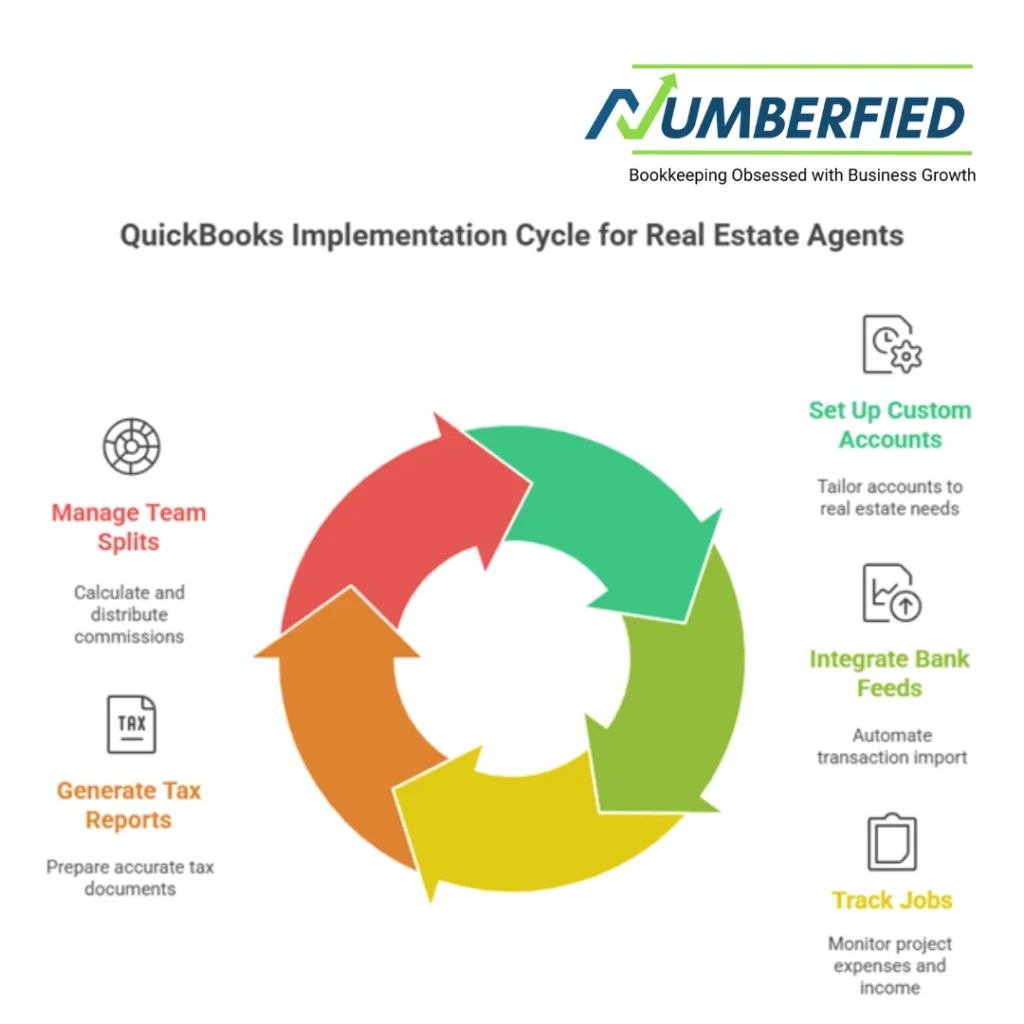
Stay Tax-Ready All Year
April sneaks up, but your books don’t have to scramble. Using QuickBooks for real estate agent bookkeeping builds the tax file as you go.
Mark Every Deduction
Tag home office utilities, cell phone percentage, and internet. Billable box for client lunches you’ll invoice back. Mileage log lives in the app. Nothing falls through the cracks.
Export for the Accountant
Tax Summary report, Schedule C categories, 1099 list. Email the files in February. Accountant plugs them in, you review the draft, and it’s done. No shoebox of receipts.
Pay Estimates on Time
Run YTD profit in March, June, and September. Divide by four, write the check. Record as Owner Draw. Miss a payment and the IRS charges interest; skip the surprise. Staying on top of quarterly taxes is simpler when using QuickBooks for real estate agent bookkeeping.
Handle a Team Without Chaos
Add agents, add rules. Using QuickBooks for real estate agent bookkeeping keeps everyone on the same page.
Give the Right Access
New agent gets Accountant access but can’t see payroll. Admin sees everything. Change passwords quarterly. Check the audit log if something looks off.
See Who Closes What
P&L by Class, year to date. Sort by net income. Post the leaderboard in the break room. Friendly competition pushes production.
Split Commissions Clean
Memorize a split transaction, 60% to the lead, 40% to the buyer agent. Paste it into every closing payment. Both classes update, and both agents see their cut.
Fix Problems Before They Grow
Stuff happens, duplicate entries, wrong categories. Using QuickBooks for real estate agent bookkeeping includes quick fixes.
Kill Duplicates
Find/Replace tool, search the description, and merge the two lines. Set the rule tighter next time. Clean once, prevent forever.
Recategorize in Bulk
Select 20 transactions, right-click, Edit, and change the account. Save. Done. Teach the team the common mistakes. Knowing these shortcuts is key to efficiency in using QuickBooks for real estate agent bookkeeping.
Update Without Panic
Backup first, update second. Test one report after. New features usually help; take the upgrade.
Hook QuickBooks to Your Other Tools
Work smarter, not harder. Using QuickBooks for real estate agent bookkeeping plays nicely with the apps you already use.
Sync the CRM
Connect to Follow Up Boss or BoomTown. New contact creates a customer card. Closed deal triggers the invoice. No double entry.
Take Payments Faster
Link Stripe or Square. Client pays online, money lands in QuickBooks, and the fee splits out. Cash flows quickly.
Enter on the Road
Phone app for everything: receipts, miles, invoices, reports. Enter the open house, review at the gym. Books stay alive.
Conclusion
You now hold the full playbook for using QuickBooks for real estate agent bookkeeping. Custom accounts, bank feeds, job tracking, tax reports, and team splits all fit together when you follow the steps. Start with one section today, add another next week, and watch the numbers work for you. The Numberfied team sets this up for agents every day. Head to https://numberfied.com/contact-us/ and book a quick call. We’ll get your QuickBooks humming so you can get back to closing deals.
Also Read: The Surprising Truth About How a Bookkeeping Services Company Can Actually Save Your Business
FAQs
I close three deals a month. Do I really need QuickBooks?
Three deals still mean 30–50 transactions, commissions, marketing, gas, and lunches. QuickBooks tags each to the listing and shows profit per deal. Spreadsheet chaos starts at deal four. I switched at five closings and wished I’d done it sooner.
How long does the initial setup take?
One focused afternoon. Open the file, build the accounts, link the bank, and import last month’s statement. I block my calendar, play music, and finish before lunch. The time you save in the first month pays you back.
What if my broker pays commissions net of fees?
Enter the gross on the invoice, record the net deposit, and add a line for Broker Fee expense. The P&L shows true earnings and true costs. Run the report and see exactly what the broker takes.
Can I track marketing ROI inside QuickBooks?
Yes. Tag every ad dollar to the listing that generated it. The Job Profitability report subtracts marketing from commission. One campaign cost $800 and brought $12,000, easy math to repeat.
How do I handle a deal that falls through?
Mark the job Inactive. Expenses stay tagged, income never posts. Run the Unrealized Deals report to write off the costs. Keeps the books honest.
What report shows my take-home after taxes?
YTD Profit and Loss minus Owner Draw equals cash in pocket. Pull it quarterly, set aside 25–30% in a savings account labeled Tax. No surprises in April.
Do I need separate bank accounts for business and personal?
One business checking, one business savings. Tag personal draws clearly. Keeps the IRS happy and your reports clean. I tried mixed accounts once, never again.
How does QuickBooks handle home office deduction?
Square footage in the Notes, percentage of utilities tagged to Home Office expense. Mileage from home to the first showing. Export the list for the accountant, who calculates the exact deduction.
What if I work for two brokerages?
Two classes, Broker A and Broker B. Tag every commission and expense. P&L by class shows production per office. No crossover confusion.
Can my assistant enter transactions without seeing my pay?
Set User Roles, give Transaction entry, but hide Payroll and Banking. They add receipts, you review and approve. Teamwork without exposure.