

Introduction
Small and medium businesses, CFOs, and finance managers face constant pressure to close books faster, maintain cash flow, and control costs. Online accounts payable services transform traditional accounts payable by moving the accounts payable process into a secure, automated, cloud-based environment. By adopting online accounts payable services, you can automate invoice processing, streamline payment process workflows, and free your AP department from repetitive tasks, letting your AP team focus on supplier relationships and strategic accounts payable management.
What are online accounts payable services?
Online accounts payable services are cloud-based accounts payable solutions and managed services that automate accounts payable workflows from invoice capture through payment. These services combine accounts payable software, automation platforms, and often managed services or outsourcing accounts payable services to deliver end-to-end accounts payable process automation. Typical online accounts payable services include invoice processing, approval workflows, purchase order matching, payment scheduling, and integration with accounting software and ERP systems.
Related terms to know
This article uses related terms such as cloud-based AP services, online invoice processing, virtual accounts payable solutions, digital AP automation, accounts payable automation, AP automation solution, and accounts payable outsourcing services to describe complementary approaches and capabilities.
Key benefits of online accounts payable services
1. Speed: Faster invoice processing and payments
Automating the accounts payable process reduces manual data entry and accelerates the accounts payable process. Online accounts payable services use optical character recognition (OCR), machine learning, and robotic process automation to extract invoice data and route it through automated AP workflows. That means invoices are validated, approved, and processed faster, reducing cycle times and enabling timely payments that can secure early payment discounts.
2. Accuracy: Fewer errors, improved audit trails
Manual AP is error-prone: miskeyed amounts, lost invoices, and inconsistent coding. An accounts payable automation solution standardizes invoice processing and captures data accurately, decreasing invoice exceptions. All changes and approvals are logged, creating a clear audit trail and simplifying month-end close and compliance.
3. Visibility: Real-time tracking and reporting
Online accounts payable services provide dashboards and reports showing invoice status, pending approvals, and cash requirements. Visibility into the accounts payable workflow helps CFOs forecast cash flow, prioritize payments, and manage supplier relationships. Integration with your accounting software or ERP ensures a single source of truth across payable systems.
4. Cost savings: Reduce headcount and late fees
Automation reduces the time AP staff spend on routine tasks, cutting labor costs and lowering per-invoice processing costs. Avoiding late payments avoids fees and maintains supplier goodwill. For businesses considering accounts payable outsourcing solutions, online services can further reduce costs by providing shared infrastructure and specialized teams.
5. Scalability and flexibility
Cloud-based accounts payable solutions scale with business needs. Whether you process dozens or thousands of invoices monthly, online accounts payable services adapt without major IT investments. Mobile approvals, integrations, and configurable workflows let you tailor the AP process to your business.
In-house AP vs online/outsourced accounts payable services
Deciding whether to keep accounts payable in-house or to adopt online accounts payable services or accounts payable outsourcing services depends on business size, complexity, and strategic priorities.
In-house AP (traditional)
- Pros: Direct control over payables, internal knowledge of supplier relationships, and immediate access to documents.
- Cons: Higher labor costs, slower invoice processing, risk of errors, limited scalability, and heavy IT/support burden if using on-premise systems.
Online accounts payable services (cloud-based or hybrid)
- Pros: Faster deployment, continuous updates, automation features (OCR, RPA), easier integrations with accounting software, mobile approvals, and improved visibility.
- Cons: Dependence on vendor SLAs and internet availability, ongoing subscription costs, and initial change management.
Outsourced/accounts payable outsourcing companies
- Pros: Turnkey solution with managed services, reduced headcount burden, operational expertise, and potential cost predictability.
- Cons: Less direct control, potential data security concerns, need for strong governance, and SLA management.
Choosing the right model
Many organizations adopt hybrid approaches: retain strategic AP functions in-house (supplier relationships, exceptions) while outsourcing or using online accounts payable services for invoice processing and payments. Assess your business needs, current accounts payable process maturity, and available resources to determine the best path.
Essential features to look for in online accounts payable services
When evaluating online accounts payable services, prioritize features that address speed, accuracy, visibility, and integration.
1. Invoice capture and processing automation
Look for OCR, machine learning, and prebuilt data extraction to automate invoice capture. The best accounts payable software improves accuracy over time and reduces manual validation.
2. AP workflow and mobile approvals
Configurable approval rules, delegation, and mobile approval capabilities keep the AP workflow moving even when approvers are remote. This accelerates the approval process and prevents bottlenecks.
3. Purchase order matching and exception handling
Automated three-way matching (invoice, purchase order, receipt) reduces exceptions. When there are mismatches, the system should provide clear tools for resolution and workflow routing.
4. Payment process automation
Integrated payment capabilities, including ACH, virtual cards, and check printing, enable secure and auditable payments. Payment scheduling and approval controls help manage cash flow.
5. Integrations with accounting software and ERP
Seamless integration with your accounting service, ERP, and banking systems prevents duplicate data entry and keeps your general ledger up-to-date.
6. Reporting, dashboards, and analytics
Real-time insights into days payable outstanding (DPO), invoice aging, and cash requirements empower finance leaders to make data-driven decisions.
7. Security, compliance, and audit trails
Choose providers that meet industry security standards, offer role-based access, and provide detailed audit logs for compliance and risk management.
8. Scalability and vendor support
Verify that the accounts payable service provider can scale with volume and offers strong onboarding and ongoing support, whether you adopt an automation solution or a managed service.
Common challenges and mistakes to avoid
Even with the best technology, organizations can fall into pitfalls when adopting online accounts payable services. Avoid these common mistakes:
- Skipping process mapping: Automating a broken accounts payable process amplifies inefficiencies. Map and streamline workflows before implementing automation.
- Underestimating change management: Train staff and approvers, communicate benefits, and provide clear documentation to drive adoption.
- Poor integration planning: Failing to integrate with accounting software or purchase order systems leads to duplicate work and reconciliation issues.
- Ignoring supplier onboarding: Suppliers must be able to submit invoices in supported formats; invest in supplier enablement to reduce exceptions.
- Focusing only on cost: Prioritize long-term value accuracy, visibility, and compliance over short-term price considerations.
Step-by-step guide to selecting and implementing online accounts payable services
Step 1: Define business goals and metrics
Determine what success looks like: reduce invoice processing time by 10%, lower per-invoice cost, improve on-time payments, or cut DPO to a target. Establish KPIs to measure outcomes.
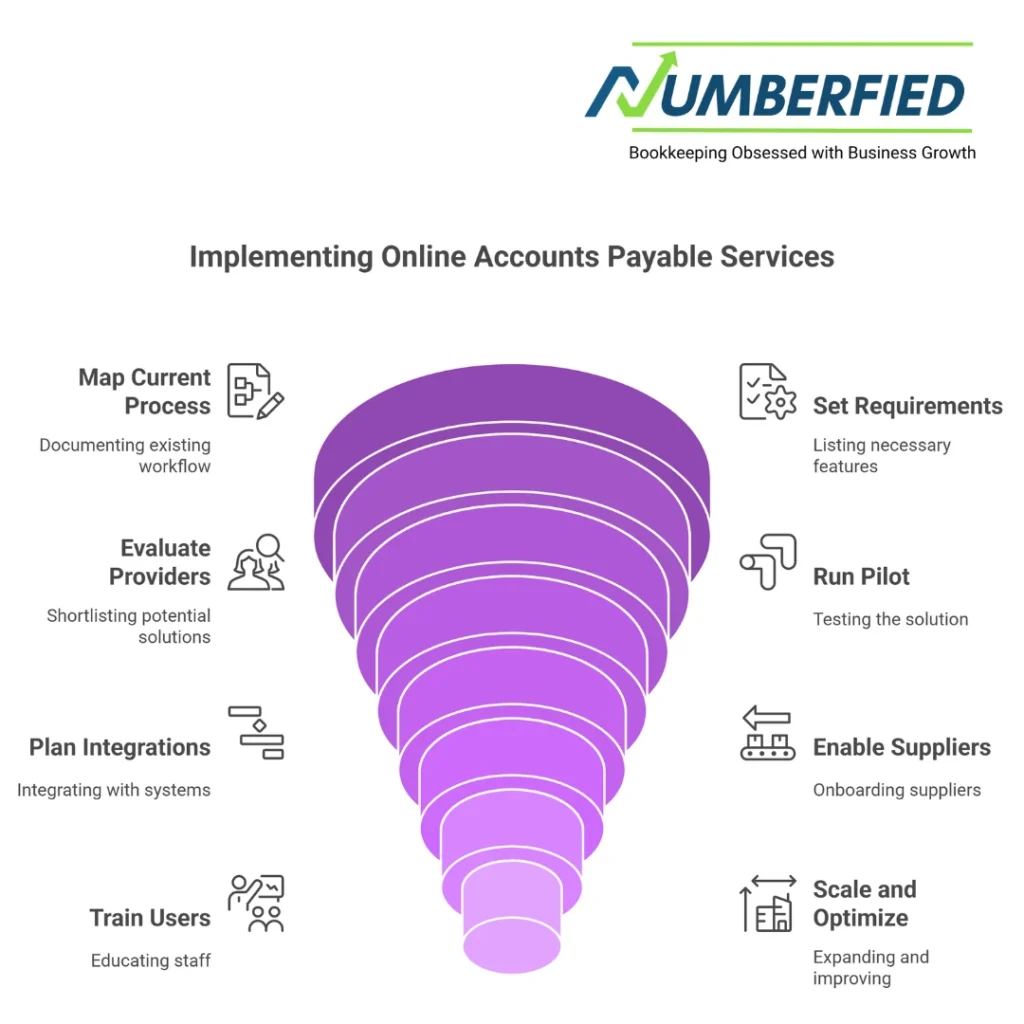
Step 2: Map your current AP process
Document your accounts payable workflow, from invoice receipt to payment, including exceptions and manual tasks. Identify pain points that automation must address.
Step 3: Set requirements
Create a list of required features: OCR invoice processing, AP workflow automation, purchase order matching, payment modes, accounting software integrations, security, and mobile approvals.
Step 4: Evaluate providers
Shortlist accounts payable service providers and software solutions. Consider cloud-based AP services, AP automation software vendors, and accounts payable outsourcing companies, depending on whether you want managed services. Evaluate demos, customer references, and case studies focused on similar business needs.
Step 5: Run a pilot
Start with a pilot for a subset of suppliers or invoices to validate the solution’s invoice processing accuracy, integration behavior, and AP workflow performance. Gather feedback from AP staff and approvers.
Step 6: Plan integrations and data migration
Work with IT and your vendor to integrate with accounting software, ERP, and banks. Migrate supplier data and establish mapping for GL codes and purchase orders.
Step 7: Supplier enablement
Communicate changes to suppliers, provide submission options, and offer onboarding support. Supplier adoption significantly reduces exceptions and improves first-pass processing.
Step 8: Train users and monitor KPIs
Provide role-based training for AP staff, managers, and approvers. Monitor KPIs and adjust workflows, rules, and thresholds to improve performance.
Step 9: Scale and optimize
After successful rollout, expand the service to more suppliers, automate additional payment types, and use analytics to uncover further savings opportunities.
Top providers and market trends
The market for online accounts payable services includes pure-play accounts payable automation software, ERP vendors with AP modules, and managed service providers offering accounts payable outsourcing solutions. Leading trends include:
AI and machine learning
AI improves invoice data capture and auto-coding, reducing exceptions and improving accuracy. Expect AP automation software to get smarter over time as it learns your invoicing patterns.
Robotic process automation (RPA)
RPA complements accounts payable automation by handling repetitive screen-based tasks and bridging legacy systems during integration.
End-to-end payable platforms and virtual cards
Payable platforms now combine invoice processing, payment execution, and analytics. Virtual card payment options offer rebates and improved reconciliation.
Managed and hybrid services
More businesses opt for hybrid models using online accounts payable services with retained in-house controls or partial outsourcing of high-volume tasks to accounts payable outsourcing companies.
Mobile-first approvals and employee experience
Approvers expect mobile approvals, notifications, and simple interfaces that accelerate the approval workflow regardless of location.
Notable providers to research include major accounts payable automation solution vendors, specialized accounts payable services companies, and accounting software platforms that offer integrated AP modules. Evaluate providers based on your specific business needs, integration capabilities, and references from similar organizations.
Measuring ROI and success
Track metrics such as average invoice processing time, cost per invoice, number of invoices processed per AP employee, DPO, on-time payment rate, and exception rates. Calculate savings from reduced labor, fewer late fees, early payment discounts captured, and improved cash forecasting to demonstrate ROI from online accounts payable services.
Checklist: Are you ready to adopt online accounts payable services?
- Clear goals and KPIs for accounts payable automation
- Documented accounts payable process and exception points
- Integration capability with accounting software and ERP
- Supplier onboarding plan
- Defined security and compliance requirements
- Change management and training plan for the AP department and approvers
Conclusion
Online accounts payable services transform the AP process by combining accounts payable automation software, workflow automation, and payment processing into a cohesive, scalable solution. For CFOs and finance managers seeking to automate accounts payable, improve accuracy, increase visibility, and reduce costs, online accounts payable services offer a clear path forward. Whether you choose a self-service automation solution, a managed service, or an outsourcing accounts payable partner, the right approach depends on your business needs and long-term strategy.
Ready to streamline, automate, and modernize your accounts payable process? Request a free demo or consultation to see how online accounts payable services can automate your accounts payable process, accelerate invoice processing, and optimize cash flow.
Contact us today to evaluate online accounts payable services and find the best accounts payable automation solution for your business needs.
FAQ
What is the best accounts payable software?
The best accounts payable software in 2026 depends on business needs, but Bill.com stands out as the top overall choice for most small to medium businesses due to its strong automation, multi-level approvals, flexible payment options, and seamless integration with QuickBooks and Xero. Tipalti excels for mid-market companies with global payment needs, while QuickBooks Online remains the best all-in-one solution for smaller operations, and Sage Intacct suits growing businesses requiring complex AP features.
What software do you use for accounts payable?
Many businesses rely on Bill.com for accounts payable because of its powerful automation, mobile approvals, and excellent integration with major accounting platforms. QuickBooks Online is also widely used for its built-in AP tools, while mid-sized companies often choose Tipalti or Coupa for advanced international payment capabilities and robust reporting.
What is the best AP system?
Bill.com is widely considered the best accounts payable system in 2026 for most small to medium businesses, thanks to its efficient invoice capture, automated approval workflows, support for ACH, checks, and wires, and strong compatibility with QuickBooks, NetSuite, and Xero.
What are the top 3 accounting software?
As of 2026, QuickBooks Online leads as the most popular accounting software for small businesses, followed by Xero, which excels in ease of use and real-time collaboration, and FreshBooks, which is the top pick for service-based and freelance businesses due to its simple invoicing and time-tracking features.
Can QuickBooks be used for accounts payable?
Yes, QuickBooks, particularly QuickBooks Online, includes full accounts payable capabilities such as entering and managing bills, scheduling payments to vendors, processing ACH or check payments, tracking expenses, and generating detailed AP aging reports.
Is Word or Excel better for invoices?
Excel is better than Word for creating invoices because it supports calculations, templates, and basic tracking, but neither is ideal for professional use. Dedicated tools like QuickBooks, Wave, or FreshBooks are far superior due to automation, payment reminders, and compliance features.
What are the three main types of accounting software?
The three main types of accounting software are cloud-based solutions such as QuickBooks Online and Xero, which offer real-time access and automatic updates; desktop software like QuickBooks Desktop and Sage 50, which provide local installation and greater control; and enterprise resource planning systems like NetSuite and SAP, which deliver comprehensive modules for large organizations.
Does QuickBooks Online have accounts payable?
Yes, QuickBooks Online provides complete accounts payable functionality, allowing users to enter bills, manage vendor payments, schedule ACH or check disbursements, track expenses, and produce accurate AP aging reports.
What is the best online bookkeeping system?
In 2026, QuickBooks Online remains the most widely used and highly rated online bookkeeping system for small to medium businesses, followed closely by Xero, which is especially strong for international operations, and FreshBooks, which is the preferred choice for service-based and freelance professionals.
What is the best online accounts payable software?
Bill.com is the leading online accounts payable software in 2026 for most small to medium businesses due to its advanced automation, multi-level approval workflows, global payment support, and excellent integrations with QuickBooks, NetSuite, and Xero. For very small businesses, QuickBooks Online offers a solid, cost-effective built-in AP solution.